
New users aren’t coming back. What should you check first?
Switch denominators for the same cohort counts, distinguish the first task from later use, and leave with a bounded problem statement and evidence plan.
On this page
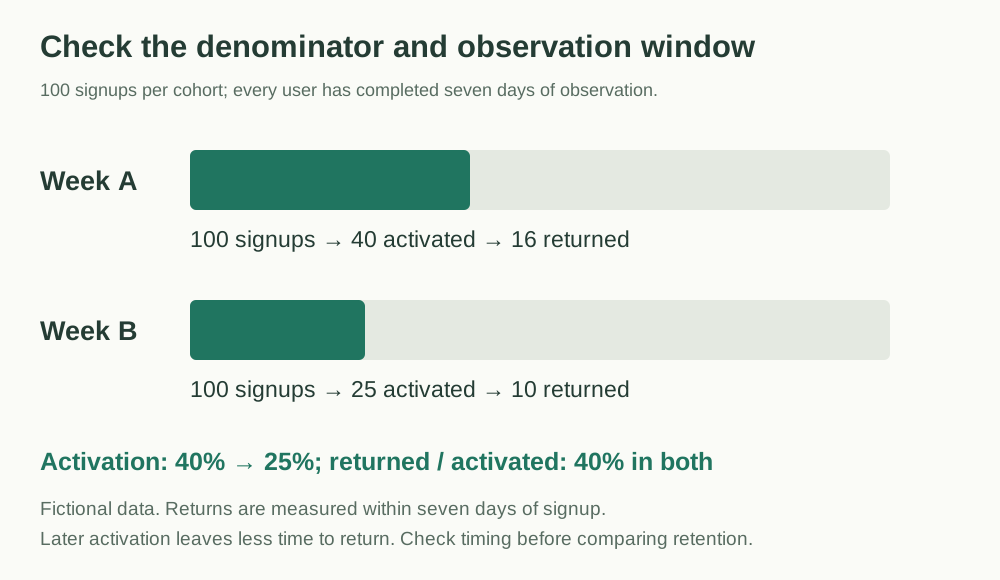
When fewer new users return, check the cohorts, denominators, and observation windows before choosing an investigation. In this fictional case, activation falls from 40% to 25% and return counts fall from 16 to 10. Yet returns among activated users are 40% in both cohorts. The counts support investigating the first task; they do not establish unchanged later retention.
Leave with a bounded problem statement and a next evidence check. Inspect the counts, switch the denominator beside the explanation, or paste two rows of your own counts. As-Is / To-Be helps state the gap; AARRR helps locate an investigation.
Define the window and the denominator
Fictional teaching case: an online scheduling tool compares users who signed up in week A with users who signed up in week B. Every user has completed a full seven-day observation period after signup.
In this example, activation means creating a timetable and inviting at least one member within those seven days. A return means editing the timetable on a different day after activation, still within the same seven-day period measured from signup. These are definitions for this example, not universal product metrics.
| Measure | Week A cohort | Week B cohort |
|---|---|---|
| Visitors | 1,000 | 1,000 |
| Signups | 100 | 100 |
| Activated users | 40 | 25 |
| Users who returned | 16 | 10 |
| Activated / signups | 40% | 25% |
| Returned / signups | 16% | 10% |
| Returned / activated | 40% | 40% |
The return rate among all signups fell from 16% to 10%. The proportion reaching activation also fell, from 40% to 25%. Among activated users, the observed return rate is 40% in both groups. This gives us a reason to investigate the first task before proposing a general re-engagement campaign.
It does not establish that retention is unchanged. Someone who activates late in the signup window has less time left in which to return. The groups are small, and their channel mix, device mix, and activation timing have not been checked. To compare post-activation retention over a fixed period, give every activated user the full observation period after activation.
Match the return window to the task cycle
The seven-day definition describes one way to observe returns. Someone who plans classes once a month may not edit again during the first week because there is no new scheduling task. Someone who adjusts class schedules daily may have more frequent opportunities to use the tool. Those tasks should not share a single return target.
For your own tool, first check whether the initial output is usable and when the next task occurs. Then observe whether people with a new task use the tool again, choose another approach, or cannot finish. This case contains no such records, so its return counts cannot establish ongoing demand. Add the task cycle and next opportunity to the investigation plan, then choose a complete observation window for that task when comparing subsequent use.
Change the denominator and inspect the comparison
The default uses the fictional cohorts above. Returns occur after activation, within seven days after signup.
Fictional case: A and B each contain 100 signups.
| Cohort | Signups | Activated | Returned | Activated/signups |
|---|---|---|---|---|
| A | 100 | 40 | 16 | 40% |
| B | 100 | 25 | 10 | 25% |
Returns are 16% and 10% of signups, but 40% of activated users in both cohorts. There is a reason to investigate the first task; comparing later retention still requires complete post-activation windows.
Read the complete counts and investigation record
New-user investigation: counts and open checks

Source: this article's fictional cohorts, not business results.

A: signups 100; activated 40; returned 16
Activated/signups: 40%; Returned/signups: 16%; Returned/activated: 40%

B: signups 100; activated 25; returned 10
Activated/signups: 25%; Returned/signups: 10%; Returned/activated: 40%

Definitions, observation windows, and investigation plan:

Each user completed seven days after signup. Returns occur after activation within that signup window; late activation leaves less time to return.

Open checks: channel/device mix, activation timing, initial output usability, task cycle, and the next opportunity to use it.

Counts describe observations; they do not establish unchanged retention, causes, or improvement effects.

Next evidence check, owner, and review date: to be agreed.
Input stays on this page. Copy or download before leaving or reloading; it is not uploaded or saved. Zero denominators are undefined. Valid counts do not verify observation definitions.
State the gap before explaining it
An As-Is / To-Be comparison turns “users are leaving” into a more precise problem:
- As-Is: 25 of the 100 users in week B activated within seven days.
- To-Be reference: week A's 40% activation rate is a historical comparison, not an industry benchmark or a promised result.
- Gap: 15 percentage points, equivalent to 15 users with the same denominator of 100.
- Unknown: where users stopped and why.
Moving from 25% to 40% would be a 60% relative increase. Calling it “a 15% increase” confuses relative change with a percentage-point difference. Keep the denominator visible whenever you describe the gap.
Use the As-Is / To-Be guide to write out the comparison. The useful output here is a bounded problem statement that another person can check against the data.
Use the funnel to locate the next investigation
AARRR separates acquisition, activation, retention, revenue, and referral. Use it to locate the part of the journey you need to inspect. This example contains no revenue or referral evidence; leave those parts unknown. Use the AARRR guide to organize the stages you can inspect.
Next, inspect the 75 week B users who did not activate. Assign each user to one state at the end of their observation window:
- Never started creating a timetable.
- Started but did not finish creating one.
- Created a timetable but did not invite a member.
The counts for these branches are not yet known. Do not invent an even split or treat the largest-looking interface problem as the cause. Check event definitions and logs first, then use interviews or observation to understand what happened. A user who did not invite anyone may not need collaboration; the missing event alone does not show that the invitation button is hard to find.
If several branches need investigation, an issue tree can keep them separate. If a specific recurring error is supported by evidence, 5 Whys can help investigate the causal chain. Each explanation still needs evidence.
Leave with a question you can investigate
Write the current result, comparison, gap, window, and denominator before listing possible causes. Record when users next need to schedule and what supports that expectation before evaluating ongoing use. For this case, the immediate question remains: where did the 75 non-activated users stop, and what evidence explains those stops?
Practice data: Cohort counts and metric definitions. Keep the unknowns in the file visible as you work; a clearer funnel is the start of an investigation, not its conclusion.
Once you have a defined problem and event records, continue with 5 Whys vs issue trees. Organize several possible paths before investigating an evidenced event in depth. Carry the records and open questions forward; that article's fictional late orders cannot replace the user logs still missing here.
Bound the change before committing development
Use the Issue definition worksheet when the investigation needs an agreed scope: current evidence, a proposed target, the gap, included work, and constraints. Keep a metric difference separate from its possible explanation. The worksheet guide uses a separate team-level case; its 30% baseline and 40% target do not replace this article's two user cohorts.
If the next decision concerns a product change, use the Product proposal to connect the user problem to a bounded solution, expected value, validation, resources, and risks. Agree prototype acceptance and exit criteria before committing development. Its controlled-review-link example is also independent: studio interviews are not activation measurements, estimates are not an approved schedule, and a pilot request is not approval.
Once an investigation supports a proposed change, use the SMART goals guide to define a target and review date. Keep a historical comparison separate from a committed target, and allow every cohort its full observation window. The guide uses a separate fictional team-level example; its figures are not results from these two user cohorts.
If you ask an AI service to review the reasoning, include the counts, operational definitions, observation windows, and unknowns. Ask it to check denominators and claims and identify missing evidence. Check the actual logs and task cycle yourself; unknown branches must not be filled with invented counts.
Start with a useful outline
Practice materials
- Cohort counts and metric definitionsJSON · 1 KB