
Percentage points vs. percent change in a work report
Recalculate 40/200 and 63/210. Distinguish a 10-percentage-point rise, 50% relative rate growth, and 57.5% count growth, retaining comparability and causal limits.
On this page
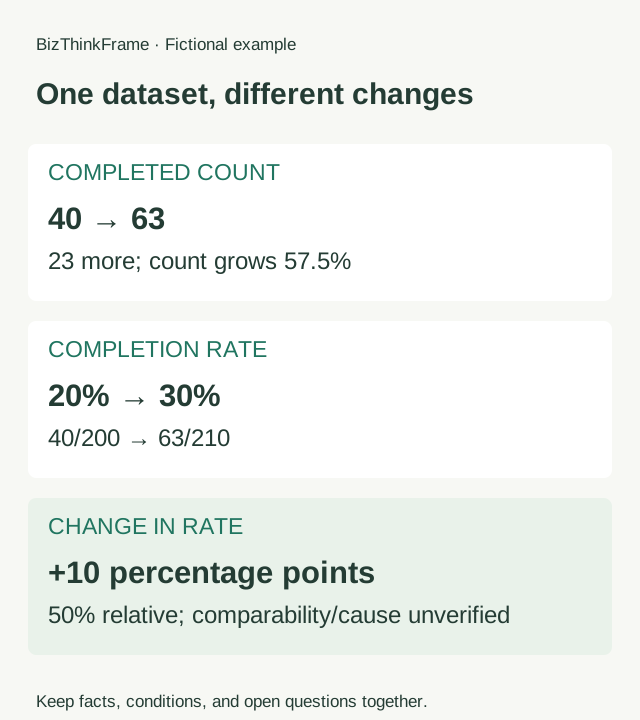
A rate moving from 20% to 30% rises by 10 percentage points, or by 50% relative to the earlier rate. These use different units of change. Name the measure, baseline, and definition. “Performance improved 50%” hides the denominator and may turn an observed change into an unsupported claim about an intervention.
This small exercise produces a report statement with counts, rates, periods, and interpretation limits. It does not assess revenue, profit, ROI, or causal effects.
Keep the numerator, denominator, and definition
Fictional teaching example: two complete observation periods use the same eligibility and action definitions. In the earlier period, 40 of 200 eligible objects complete the specified action; later, 63 of 210 do. Population composition and other conditions have not been checked for comparability. These are not real business records.
| Period | Completed: numerator | Eligible: denominator | Completion rate |
|---|---|---|---|
| Earlier | 40 | 200 | 40 ÷ 200 = 20% |
| Later | 63 | 210 | 63 ÷ 210 = 30% |
Using the same eligibility rule does not prove comparable population composition, channels, or opportunities. For actual work, add dates, the action definition, eligibility, observation window, and record source. Leave comparability unverified when those checks are missing.
Calculate different changes separately
| Question | Calculation | Result |
|---|---|---|
| How many more completed? | 63 − 40 | 23 more |
| How much did the count grow relative to before? | (63 − 40) ÷ 40 × 100% | 57.5% |
| How far apart are the rates? | 30% − 20% | 10 percentage points |
| How much did the rate grow relative to before? | (30% − 20%) ÷ 20% × 100% | 50% |
Percentage points describe the direct difference between percentage rates. Relative change divides that difference by the earlier rate. Count growth uses 40 as its baseline and gives 57.5%; rate growth uses 20% and gives 50%. Do not exchange these results.
Calculate with unrounded values, then choose display precision. Recalculating differences from rates already rounded for display can produce inconsistent results. For less tidy numbers, retain enough precision or explain rounding so the table and prose agree.
Calculate with your own counts
For a part-to-whole rate. Enter both numerators and denominators to retain counts, percentage points, and relative change. The calculator does not verify population comparability.
Results appear when all counts are valid. Missing values, a zero denominator, or a numerator exceeding its total produce no conclusion.
Inputs stay on this page and are not retained after reload. Display uses at most two decimals; changes below rounding precision retain their sign. A before/after change does not establish causality.
Write the measure and the limit together
The action completion rate rose from 20% (40/200) in the earlier period to 30% (63/210) later: an increase of 10 percentage points, or 50% relative to the earlier rate. Completed objects increased from 40 to 63. Population comparability still needs checking; the change alone does not show that an intervention caused the increase.
In a short update, lead with the unit most relevant to the question and retain counts nearby. Do not hide an unverified condition in a distant footnote while the headline claims a demonstrated improvement.
“The count grew 57.5%, so efficiency grew 57.5%” lacks an effort or time measure. “The rate rose 50%, so the new intervention worked” lacks a comparable design and checks on alternative explanations. Correct arithmetic does not establish the business inference that follows it.
Handle a zero baseline, missing data, and changing denominators
| Situation | Treatment |
|---|---|
| Earlier 0/200; later 63/210 | From 0% to 30%, up 30 percentage points. Relative change is undefined because the baseline is zero; do not report infinite growth. |
| Earlier 40/200; later 0/210 | From 20% to 0%, down 20 percentage points and 100% relative to the earlier rate. |
| Earlier numerator missing | The two-period change cannot be calculated; missing is not zero. |
| Denominator zero | The proportion is undefined; check scope and definition. |
| Numerator exceeds denominator | Invalid for this completed-share measure; check definitions, duplicate counts, and records. |
Here the numerator must be part of the denominator. Other ratios, such as revenue divided by cost, can exceed 100% and need different checks. A larger denominator also changes the meaning of counts: count growth and rate change can point in different directions.
Check your own statement
Define eligibility, completion, and the complete observation window first. List both numerators and denominators, calculate each rate, and choose the question and unit your report should answer. Check composition, missing records, measurement, and other changes; separate the observation from its explanation.
Download the numerical material and blank reporting outline. The calculator alongside the worked example accepts this fictional dataset or your own nonnegative integer counts. It retains both periods' counts, percentage points, relative rate change, and count change. A zero baseline is marked undefined; missing values, zero denominators, and counts exceeding totals produce no conclusion.
Copy or download the calculation explanation. Display uses at most two decimals; nonzero changes below that precision use scientific notation to avoid implying zero. The four counts are sufficient to calculate. Add measure, period, and comparability notes in the optional section when preparing a complete statement. Check those details yourself. Arithmetic does not assess attribution. Inputs stay on this page and are not retained after reload.
Use the data definition card, then copy the explanation into your existing report and add the record source and actual dates. For the distinction between deliverables and explanations, read the work-reporting introduction.
Ask AI to check the wording
Copy the calculated explanation and the relevant source records into your usual AI assistant. Retain the original counts so you can compare its answer with this calculation.
Review this data statement using only the supplied counts and definitions.
Keep count change, percentage-point difference, and relative rate change separate.
Show each baseline and denominator. Flag missing periods, definitions, or
comparability checks. Do not turn an observed change into an efficiency or causal
claim. Suggest one report paragraph that retains the limits, and show the arithmetic.
My records and calculated explanation:
[paste material]
Start with a useful outline
Practice materials
- Fictional rate data and calculationsJSON · 1 KB
- Blank reporting outlineTXT · 1 KB